Focus Stacking
Shoot every distance in focus, then merge it into one frame
Macro, fast lenses, too little depth of field — there is always a part of a single frame that is out of focus. Focus stacking merges 2–15 photos of the same scene, same viewpoint and only the focus distance different into one fully sharp positive photo: NegRGB judges which frame is sharpest at every spot and blends only those parts, with auto align and equalize brightness on by default so even hand-held or re-loaded frames merge cleanly.
Highlights
- —Select 2–15 photos of the same scene and viewpoint that differ only in focus distance, right-click and merge
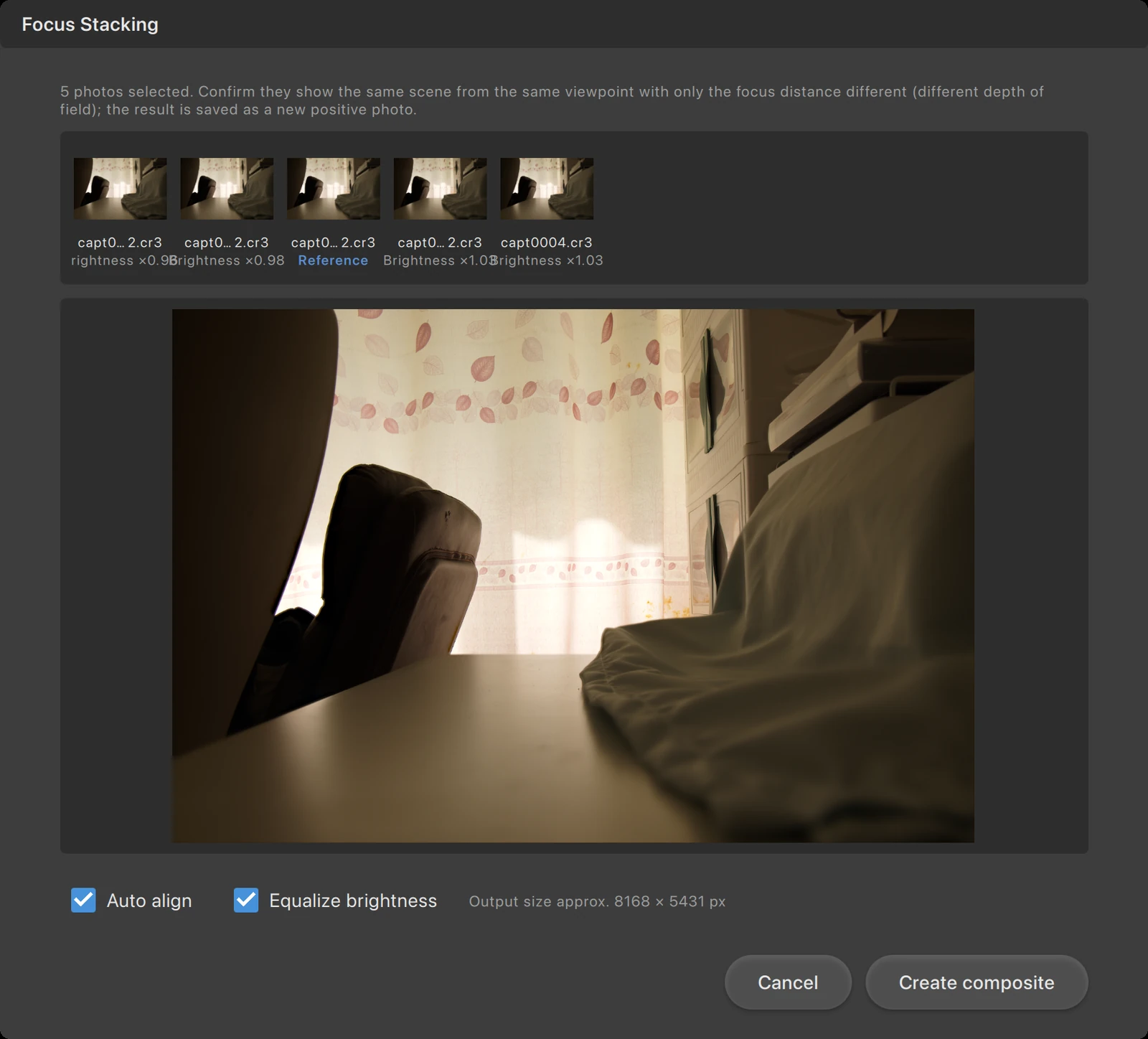
- —The filmstrip marks the sharpest frame as the reference — the output framing and brightness anchor — and shows relative brightness for the rest
- —Every spot is taken from the frame that is sharpest there, so the result is sharp throughout
- —Auto align corrects slight shifts, rotation and the focus-breathing scale change, then crops to the common valid area
- —Equalize brightness anchors every frame to the reference, removing brightness steps at focus boundaries
- —Outputs a 16-bit linear TIFF as a new positive photo in the current film, ready to keep editing
- —Clear division of labor: focus stacking for different focus, exposure composite for different exposures
Why focus stacking
The wider the aperture and the closer the subject, the shallower the depth of field: in macro work and still-life close-ups only a narrow band is sharp and both foreground and background blur. Keep the camera fixed and shoot a few frames at different focus distances — each one holds a different sharp range; focus stacking stitches those ranges together into a photo sharp from the nearest point to the farthest. It is cleaner than stopping the lens down for more depth, and free of the diffraction softening that small apertures bring.
- —Same scene, same viewpoint — only the focus distance may differ
- —Auto align is on by default: focusing changes the framing slightly and re-loading can shift the camera a little
- —Turn auto align off when the sources are already aligned, to avoid unnecessary cropping
The reference frame and per-spot blending
The filmstrip lists every source frame, with the sharpest one marked as the reference — it becomes both the output framing and the brightness anchor, while the others show their relative brightness. During the merge NegRGB judges, at every spot, which frame is sharpest there and blends only those parts; the preview updates live in the center and the estimated output size is shown below. To keep alignment reliable, crop, perspective, masks, lens correction and sharpening do not apply to the inputs, while each photo’s tone/exposure settings, flat field, dust strokes and rotation/flip do.
- —The reference frame is chosen by sharpness, not picked by hand
- —Equalize brightness is on by default and anchors every frame to the reference, avoiding brightness steps at focus boundaries
- —The dialog stays open while rendering and can be cancelled; it closes once the result is imported
Output and division of labor
The result is a 16-bit linear TIFF positive photo, written into the current film next to its sources and selected automatically; it is not inverted again on reopen, and starts with default processing parameters — sharpen or grade it further like any other photo. With auto align on, the output is cropped to the common valid area, so edges may lose a little. Note the split with exposure composite: focus stacking solves different focus, exposure composite solves different exposures — do not mix different scenes or viewpoints.
- —16-bit linear TIFF output, marked as a positive and ready for further editing
- —With auto align on, cropped to the common valid area; edges may lose a little
- —Different focus → focus stacking; different exposure → exposure composite